How to Use Search Tools on IDC.com

Simple Search

Use Simple Search which appears at the top of every IDC.com page, to look for one or two keywords or a single phrase only. To search for a phrase, enclose the phrase in quotation marks and do not append additional words before or after the quotes. You can also specify a language in your search; however, because most of our research is written in English, you may receive fewer results. In the language dropdown menu, retain the default "All languages" option to search on all.
Simple Search queries available research from IDC and Insights companies but does not include analyst profiles or product information. Please note that IDC retains only 18 months of research online; Insights company research is available without restriction. Events are included up to one year in advance.
Spaces or commas are interpreted as "OR." A query for IT Spending will be interpreted as IT OR Spending.
You can use the words AND, OR, and NOT as Boolean operators in your query.
Advanced Search: Search All
Use Advanced Search and the Finder tools to build complex queries, define date ranges, select languages, and specify searches only on Insights content. Each keyword field allows selection parameters to narrow your search. If you would like to search only on subscribed research, use the Advanced Search form and select "All my research" in the Access section. You must be logged in to search on your research only.
Spaces or commas are interpreted as "OR" inside each keyword field. The words AND, OR, and NOT can be used as Boolean values in each keyword field. Quoted phrases can be used so long as no additional words are used in the keyword field outside of the quotation marks.
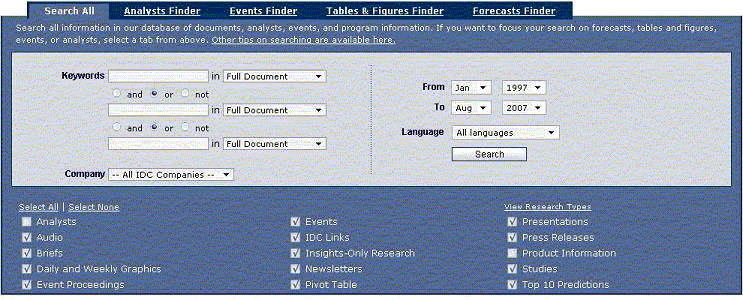
Advanced Search: Finders
The Finders are specialized search tools that focus on unique aspects of our content.
Analyst Finder
- Use this tool to find an analyst by keywords.
- Enter keywords and click on Submit.
- Results will pair the analyst's profile with the number of results matching your keyword search, sorted by descending order of results per analyst.
Event Finder
- Use this tool to search only event content up to one full year into the future.
- Focus your search on "Event Title" only or "All Event Info," including agenda.
- Leave fields blank to obtain a list of all upcoming events.
Tables and Figures Finder
- Use this tool to search for only the text contained in table titles, figure titles, or the complete table itself.
- Enter keywords and click on Submit.
- The results page displays title matches of each table and figure with a direct link to the parent document and provides the ability to download directly to Excel.
Forecast Finder
- Use this tool to narrow lists of IDC forecasts by market sector or by the focus area within that market and to select from available date ranges covered in the forecast.
- After you obtain results, use the "NARROW RESULTS" menus to further focus results by region and analyst.
Search Results And Relevancy
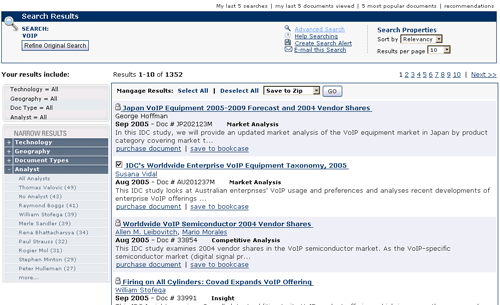
- Results from Simple Searches boost relevancy for documents published within the last 90 days, for documents with the word "Worldwide" in the title, and for matches of your keyword in the title, document number, and author last name fields.
- Results from Advanced Searches boost relevancy for documents published within the past 90 days, regardless of date range selected. Searches return 10 results per page by default; this number is user-selectable up to 100.
- Sort options include relevancy and publication date.
- On all results pages, the "NARROW RESULTS" menus focus results. Results are categorized by Technology, Geography, Document Types, and Analyst.
Manage Results
Each results page has a "Manage Results" section above the actual results set, with choices to select unlocked documents for:
- Save to Zip (download the PDF versions of documents)
- Save to Excel (save a summary of the results set to your hard drive)
- Print Results (print a summary of the results set)
You must be logged in to take advantage of Manage Results. You can select only documents you have access to; only 10 documents per download are allowed, and each user is allowed up to 75 document downloads to Zip a day.
Topics and Document and Event Types
All research documents on IDC.com are classified with at least one technology topic or region, which can be found under the Research tab. A comprehensive taxonomy of our site topics can be downloaded here (PDF format):
Each document and event type provides structured information to help you answer questions about market size, products, and actions. To view a comprehensive list of each type of document or event and what it covers, see the IDC Research Types document description page:
Saving Searches
Queries can be saved for running again at a later date using the "Create Search Alert" link in the Search Results box at the top of the page. Your query will be saved in its present format with a title you assign to your Bookcase.
Email Searches
Queries can be emailed by clicking on the "E-mail this Search" link in the Search Results box at the top of the page. Your email address will appear automatically, with an option to add a recipient address. A URL that repeats the query will be created in the body text of the message. The recipient will need to have an email program that recognizes HTTP URLs. Otherwise, he or she will have to copy and paste the entire URL into a Web browser to view the results of your query.
These instructions pertain to www.idc.com, www.energy-insights.com, www.financial-insights.com, www.government-insights.com, www.healthindustry-insights.com, and www.manufacturing-insights.com. Other IDC Web sites may employ different search tools.
|








